The monitor's stuck at 30Hz. The dock's charging at half speed. Pro tells you which part is lying.
Somewhere in the chain (port, cable, adapter, device) one link is underperforming. Pro reads the actual negotiation straight from macOS and points at the weak one. No estimates, no guesswork.
One-time purchase. Works on up to 2 Macs. macOS 14+ required.
Who needs Pro
One dock at work, one at home, same laptop, different behaviour. Pro shows what each dock actually negotiated, so you stop blaming the Mac.
The box said Thunderbolt 4 and 100W. Pro shows whether you're getting it, and names the part short-changing you if not.
A colleague's SSD keeps dropping mid-copy and it's your problem now. Port health counters, event traces, and live power beat guessing.
Fifteen cables, none labelled. Pro tells you exactly what each one is, including the ones lying about their capabilities.
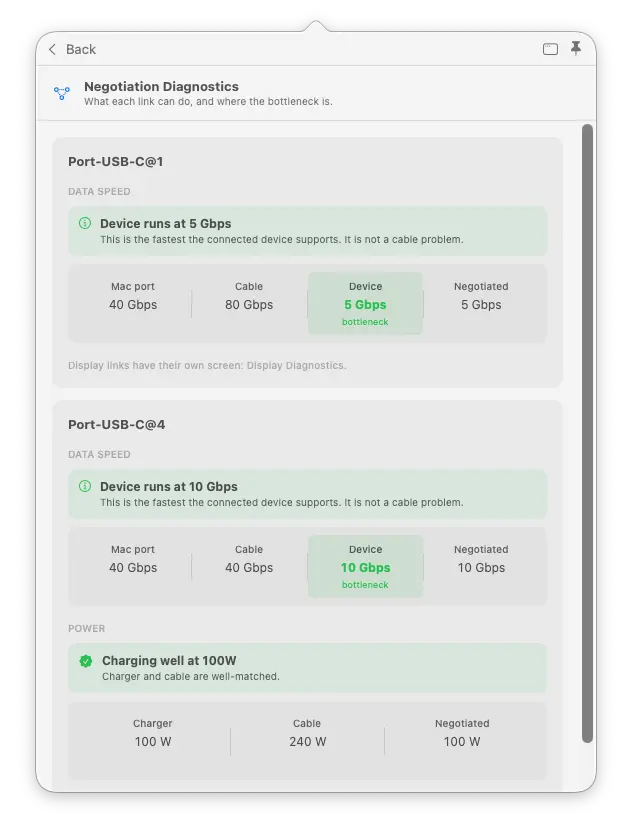
You bought a 40Gbps cable and the drive runs at 5.
Port, cable, and device side by side against what was actually negotiated, weak link highlighted.
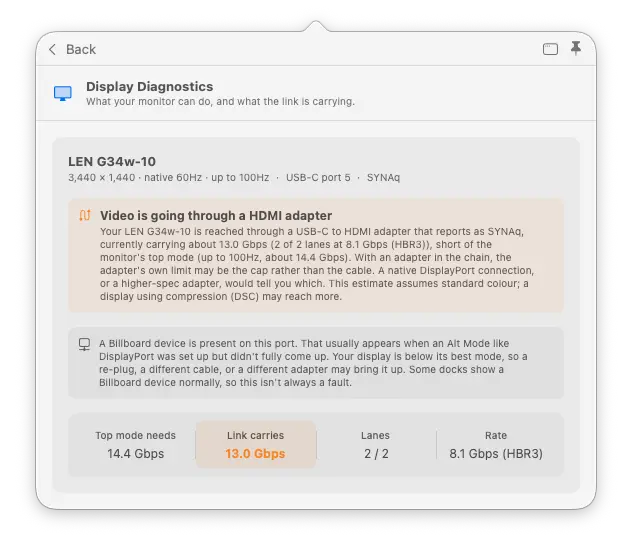
The new 4K display is running at 30Hz and macOS won't say why.
Your monitor's capability vs what the link is carrying, adapter named. It only says "not the cable" when the evidence shows it.
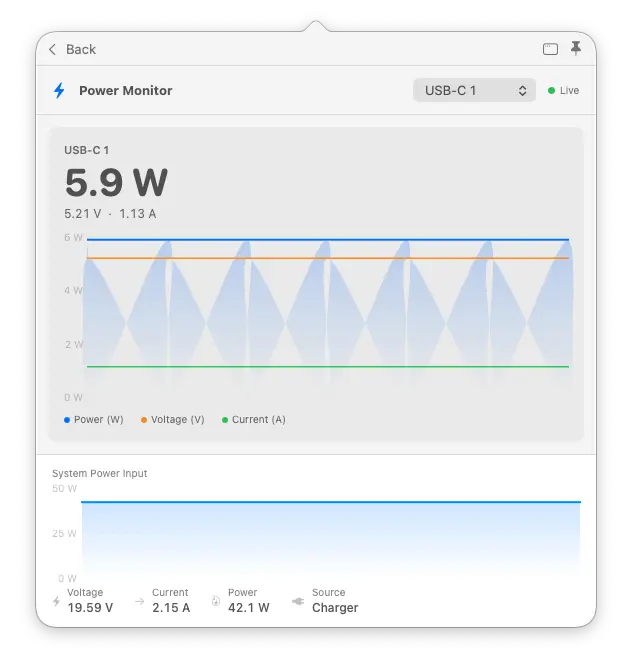
The 100W charger that feels slow.
Real watts, amps, and volts per port, updated every 2 seconds.
You live in SSH and tmux, not a menu bar.
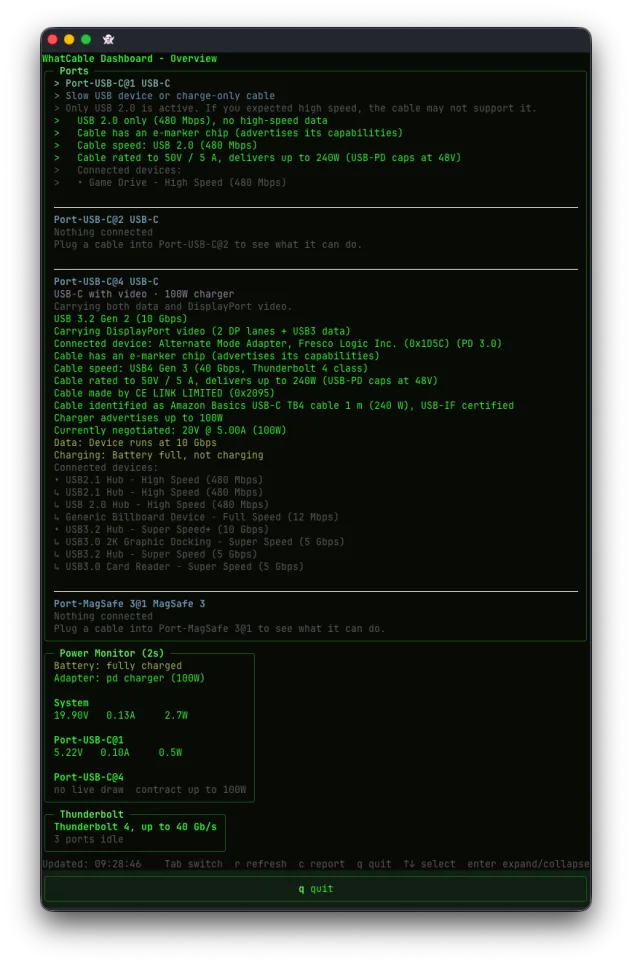
The whole picture in a full-screen terminal view: every port, its cable, data speed, power, Thunderbolt state, and a plain cable-health verdict. Three screens, Tab to switch. Run whatcable --dashboard.
What reviewers said.
A tiny app that does one thing, does it well.
WhatCable does a fine job of analyzing the cables attached to your Mac.
Finally tells you what your USB-C cables can actually do.
From Pro users
Clear explanation, no corporate nonsense, and then a new version shipped almost immediately. That is honestly impressive.
The app is so good, love it.
Great software. Great support.
Simple, one-time pricing
No subscription. Pay once, use it forever. Free updates while Pro is in active development.
- Every Pro feature unlocked immediately
- Works on up to 2 Macs with one key
- Licence key delivered by email instantly
- 30-day offline grace period, no internet needed day to day
- macOS 14 Sonoma or later, Apple Silicon
For the convinced: everything Pro unlocks
Everything in the free app, plus deep diagnostics that read directly from IOKit, no extra software, no root access needed.
Negotiation Diagnostics
Per connection, see what the Mac port, the cable, and the device each support against what was actually negotiated, side by side, with the weak link highlighted. Includes a cross-check of the cable's e-marker against the Thunderbolt controller, so a cable that under-reports itself is caught. Pro screens open in place inside the popover, with an optional detach into their own window so a screen can stay open while you swap cables.
Display Diagnostics
Reads your monitor's capability and its live on-screen mode straight from macOS, then compares both against what the DisplayPort link is carrying, so a screen stuck below its top resolution or refresh finally has an explanation. Because it reads the live mode, it shows the true resolution even on 5K and 6K displays, and when a screen reaches its top mode using compression (DSC) it confirms you're at full quality instead of guessing. If a USB-C to HDMI or DisplayPort adapter is in the chain, it names what the adapter reports itself as. It only says "not the cable" when the evidence shows it, a Thunderbolt tunnel or every lane already in use, and never cries wolf when the shortfall could just be the mode you have selected.
Live power metering
Real-time watts, amps, and voltage per port. Updates every 2 seconds from the battery controller. See exactly what your cable is delivering right now.
PD contract inspector
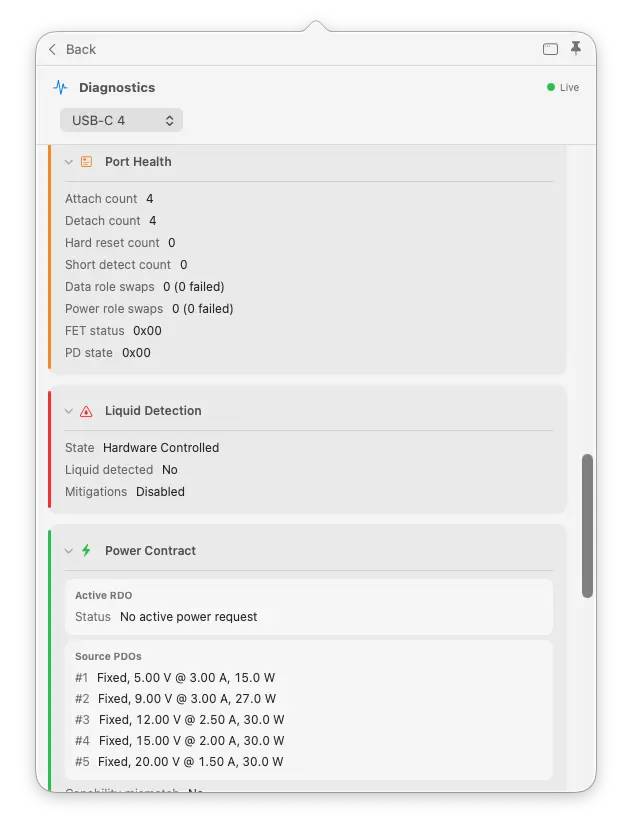
See the full negotiated power delivery contract: active voltage and current, all available PDOs decoded with type-aware formatting, and any capability mismatches flagged.
Cable resistance estimation
Multi-point regression across power samples estimates cable resistance in milliohms. Useful for spotting worn or marginal cables before they cause problems.
Port health counters
Lifetime attach/detach events, hard resets, shorts, I2C errors, role swap stats, and FET failures per port. See how a port has been treated over its lifetime.
PD event trace
Decoded protocol-level event history per port. See attach/detach sequences, contract negotiation steps, and hard reset events as they happen.
DP Alt Mode details
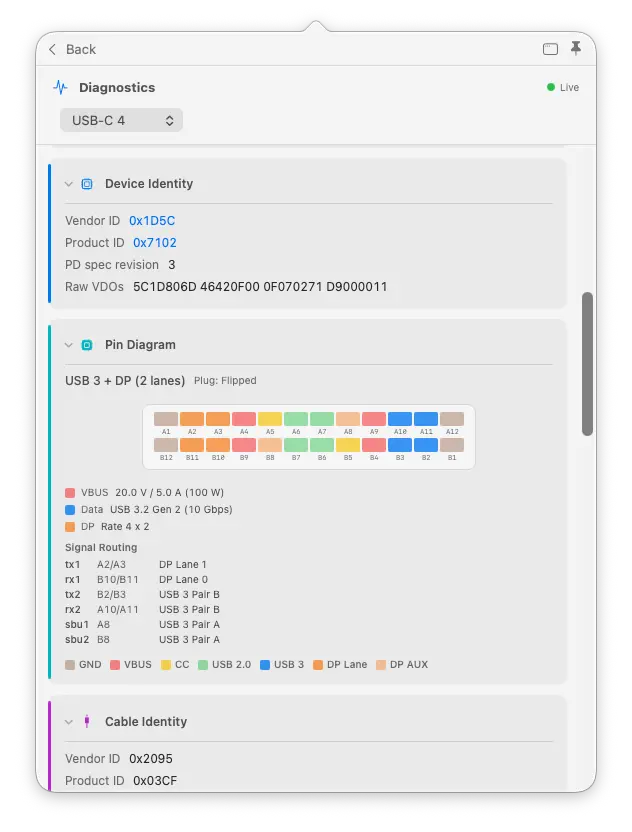
Lane count, link rate, tunneled vs native, full EDID with monitor model, manufacturer, and year for any display connected over USB-C.
Raw VDO identity
Full Discover Identity VDOs from SOP and SOP', the cable plug itself. Go beyond the e-marker summary to the raw fields your cable's controller actually reported.
Liquid detection
LDCM sensor status per port. See whether the liquid contact indicator has been triggered on any port, useful for diagnosing intermittent charging faults.
Power monitor window
Dedicated SwiftUI window with live Charts showing watts and voltage over time per port. Pin it while you test a charger or cable under load.
CLI monitor mode
whatcable --monitor streams live power and cable state to your terminal. Pipe it, script it, log it.
TUI dashboard
A live full-screen terminal view of ports, power, and Thunderbolt. Three screens, updates every 2 seconds. For the SSH and tmux crowd: whatcable --dashboard.
Widget power sparkline
Desktop widget shows a live power chart alongside cable status. Glance at your desktop and see charging trends without opening anything.
CC advertisement level
Rp current advertisement level with inferred CC line voltage. See what current level your port's pull-up resistor is advertising to attached devices.
What's in each tier
The free app covers everything most people need. Pro is for engineers, power users, and anyone who wants the full picture.
| Feature | Free | Pro |
|---|---|---|
| Cable identity | ||
| Cable type (active / passive / optical) | ||
| E-marker identity (VID/PID, vendor name) | ||
| Speed and power ratings from e-marker | ||
| Raw VDO identity (SOP and SOP') | ||
| Power | ||
| Basic charger info (voltage, wattage) | ||
| Live power metering (watts, amps, volts) | ||
| PD contract details (all PDOs, active RDO) | ||
| Cable resistance estimation | ||
| CC advertisement level | ||
| Port diagnostics | ||
| Negotiation Diagnostics (Mac port / cable / device breakdown) | ||
| Display Diagnostics (monitor top mode vs link) | ||
| Connection state and orientation | ||
| Thunderbolt link info (gen, lanes, bandwidth) | ||
| Port health counters (resets, errors, FET failures) | ||
| PD event trace | ||
| DP Alt Mode details and EDID | ||
| Liquid detection sensor status | ||
| App and CLI | ||
| Menu bar app with popover | ||
| Desktop widgets (small / medium / large) | ||
JSON output (whatcable --json) | ||
| Power monitor window (live charts) | ||
CLI monitor mode (whatcable --monitor) | ||
TUI dashboard (whatcable --dashboard) | ||
| Widget power sparkline | ||
Common questions
Does this work on Intel Macs?
What macOS version do I need?
How does activation work?
Can I use one key on multiple Macs?
Is the free version still available?
What if I need a refund?
Ready to go deeper?
One-time purchase. Works on up to 2 Macs. Unlocks immediately.